Monday, 24 December 2018

How to Add pickup Note for Uber Drivers

Uber is a peer-to-peer ridesharing, taxi cab, food delivery, bicycle sharing and transportation network company headquarter in San Fransisco, California.Founded in March 2009.Uber Platform can be access by website or mobile app like android or IOS.
Recently In Mobile app a new update comes from which help to Uber driver. this is known as "Add Pickup".  This new feature allows users to leave an extra note for the Uber Driver that can provide some extra help to Uber partner driver to find and reach your location quickly. This feature comes in handy especially while booking made in a relatively crowded situations or some society which have many gates.
 Following instruction would follow to use this feature.


PreRequirement:-

1. Download and install updated Uber App form App store.

2. Internet Connectivity.

Steps to follow during leaving pickup note.


Step1:- Open Uber App on Your smartphone.


Step2:- Select the drop location as per your need.


Step3:- Choose the cab you want to book.


Step4:- Make the booking.


Step5:- Once done, Swipe up the slider that contains all details.


Step6:- Now look for the option "Any pickup notes?".


Step7:- Tap on it and start typing message and send.


Saturday, 22 December 2018

How to delete apps on Android

Here’s how you can remove an app from your Android smartphone.


Step1:- Open Google Play. 
Step2:- Press the hamburger menu icon on the top left corner. Go to My apps & games. 
Step3:- Go to the tab labelled Installed. 
Step4:- Here you will see the list of all apps installed on your device. Tap the name of the app you want to uninstall. 
Step5:- Tap Uninstall on the resulting screen.

If you know the name of the app you want to uninstall, you can do that by following these steps:

Step1:- Open Google Play.
Step2:- Type the name of any app you’ve installed on your phone in the search bar at the top.
Step3:- Select that app from the list of results.
Step4:- Tap Uninstall on the Google Play.

You can also uninstall apps via these steps on Android:

Step1:- Open the app drawer.
Step2:- Tap and hold the icon of the app you want to delete and drag it to the top of the screen where you see Uninstall.
Step3:- Alternatively, you can go to Settings -> Apps.
Step4:- Now select the app you want to delete. Tap Uninstall.

This will remove the app from your Android phone. Note that these steps may vary slightly if your phone doesn’t have stock Android.

Thursday, 20 December 2018

How to send Message Securily

We have seen that in many cases when we are sending message, we want that no one can see our message only receiver able to see those message for sending the message we can use cryptography and steganography is one of the technique of cryptography..
 So today we will learn about steganography and how the message will be send using this technique.

Steganography

Steganography is a technique of hiding data within data. Encryption can also be used in steganography to protect data to access the unauthorized user.
      Steganography can apply with images,audio,video files.Typically, however, steganography is written in characters including hash marking, but its usage within images is also common. At any rate, steganography protects from pirating copyrighted materials as well as aiding in unauthorized viewing.

Let's see how steganography will be apply with image.

Step1:- Open command prompt in your PC/Laptop.

Step2:- type

   echo  message >> image file name

ex.   echo " hello juliya how are you?" >> xyz.jpg

Now your message have written in the image and image is look like a simple image you can see your written message thru right click of image and then go edit with any text editor then in the last you will see that your message is write. 

Monday, 13 August 2018

How to take Screenshot in window 10

In some situation while working in our computer we need to screenshot  of the window.In window 10
Microsoft gives better facility to take screenshot of entire window or some part of window.

1.How to take screenshot of entire screen in window 10


  • Press Windows Key+Print screen
  • Go to picture library of your computer and see the screenshot folder.Here you will find the screenshot saved.
Note:-You can also just press Print Screen and open MS Paint. Now press ctrl + v to paste the screenshot in Paint. You can now save it anywhere you like.

2.How to take screenshot of current window only


If you want to take screenshot of an app that you are open follow these steps
  • Click on the app you want to take a screenshot. Make sure it’s in the foreground and not behind other open apps.
  • Press alt + Print Screen.
  • Open MS Paint.
  • Press Ctrl+V
  • This will paste the screenshot of the open window in Paint. You can save the screenshot anywhere you like.


Enjoy...

Thursday, 9 August 2018

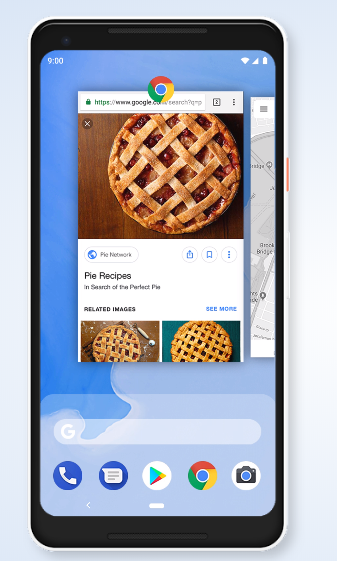
Google Release Android 9 Pie fully based on AI(Artificial Intelligence)

Android 9 Pie harnesses the power of Artificial Intelligence to give you more from your phone.Now it is very smarter,faster and adapts as you use it.

Tailored to you


Android 9 adapts to you and how you use your phone, learning your preferences as you go. Your experience gets better and better over time, and it keeps things running smoother, longer.

Adaptive Battery


Go more with a single charge. Adaptive Battery learns how you like to use your phone, so the apps and services you don’t use as much aren’t a battery drain.


Adaptive Brightness


In Android 9 Pie You don't worry to change your brightness.It automatically adjust brightness based on situation.If your phone is in darkness its bright will be high and vice versa.


Getting around just got easier


Switch between apps and get to what you need more naturally by using gestures instead of buttons.

Thursday, 12 July 2018

Samsung Largest Smart Phone manufacturing factory in India

Samsung is a South Korean multi national Company.It produces various products like Consumer electronic (LCD,LED, PDP ,CRT). Mobile phone, Digital Camera,Application processors etc.
Samsung is founded in 1 March,1938 by Lee Byung-chul. Headquarters in  Seoul(South Korea).

July 9,2018 South Korean president Moon Jae-in and Indian Prime Minister Narendra Modi   inaugurate largest mobile manufacturing factory in Noida (India,Uttar Pradesh).
The target of this factory producing 1.2 Crore phone per month.


Samsung announce that more than 30% phone will be export to other company.It shows that Indian market is open for all manufacturing company who want to manufacture in India.

Saturday, 28 April 2018

Virtual Private Network(VPN)

Do you know? when you search any data on internet it is not secure.All activity that you are doing seen by ISP(Internet Service Provide) and they can track you. So in such situation you need to secure your data.There are several way to secure your data on internet VPN is one of them.

Virtual Private Network is a technology that create a safe and secure or encrypt your data on less secure network such as Internet.VPN technology was developed as a way to allow remote users and offices to securely access data ,applications and other resources.

The information transmitted between the two locations via the encrypted tunnel cannot be read by anyone else because the system contains several elements to secure both the company's private network and the outside network through which the remote user connects through.

The first step to security is usually a firewall between the client and the host server, requiring the remote user to establish an authenticated connection with the firewall. Encryption is also an important component of a secure VPN. Encryption works by having all data sent from one computer encrypted in such a way that only the computer it is sending to can decrypt the data.

Main Protocol Use By VPN

There are three main protocol use with VPN Tunnels.These protocols are generally incompatible with each other. They include the following:

IPSec:-
 A set of protocols developed by the IETF to support secure exchange of packets at the IP layer. IPsec has been deployed widely to implement VPNs. IPsec supports two encryption modes: transport and tunnel.

PPTP:-
The Point-to-Point Tunneling Protocol is a technology for creating VPNs, developed jointly by Microsoft, U.S. Robotics and several remote access vendor companies, known collectively as the PPTP Forum.

L2TP:-
Layer Two (2) Tunneling Protocol is an extension to the PPP protocol that enables ISPs to operate Virtual Private Networks (VPNs).